Connected architecture diagrams
Uxxu transforms architecture diagrams into a **connected architecture map**. Instead of isolated diagrams, every view is linked to the architecture elements it represents. This allows teams to explore complex systems naturally, moving from high-level overviews to deeper technical details while always maintaining context.
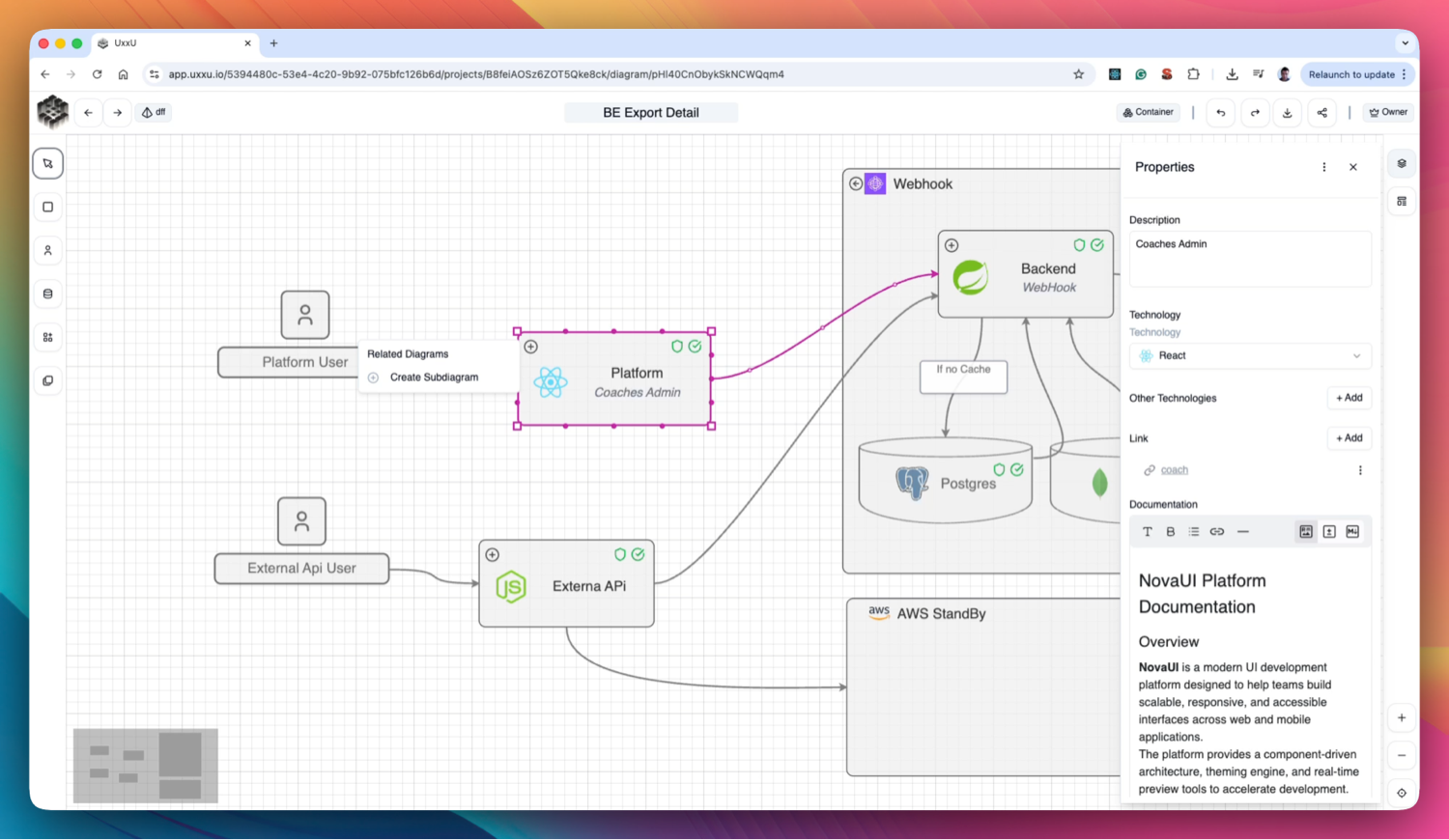
Connected Architecture
Linked Architecture Diagrams
Diagrams in Uxxu are not isolated images.
Each diagram is connected to architecture elements such as systems, containers, components, and actors, ensuring consistency across views.Drill Down into Details
From a system context diagram, teams can create container diagrams and component diagrams that explain how systems work internally.Each level adds more detail while remaining connected to the overall architecture.
Sub-Diagrams for Deeper Views
Systems, containers, or applications can have subdiagrams that provide deeper explanations of their internal structure, dependencies, and workflows.Explore Architecture Like a Map
Navigation works similarly to Google Maps:- Start with a high-level architecture overview
- Zoom into systems
- Explore containers and components
- Understand internal interactions
This makes complex architectures easier to explore and understand.
Architecture That Stays Connected
Because diagrams share the same architecture elements, updates remain consistent across all views.
This prevents duplicated diagrams and ensures your architecture remains accurate over time.
Why Connected Diagrams Matter
Traditional architecture diagrams are static and disconnected.
Uxxu turns them into a navigable architecture map, helping teams explore, understand, and maintain complex systems more easily.
Get started with Uxxu
Uxxu is a collaborative software architecture platform built around the C4 model. Teams use Uxxu to design, document, analyze, and evolve complex systems. Move beyond static architecture diagrams with connected views, dependency intelligence, technology lifecycle management, and real-time collaboration.
Start modeling your architecture today. Organize systems into projects, create C4 diagrams at multiple levels of detail, connect diagrams together, and explore architecture insights that help your team understand complexity and manage technical debt.
Frequently Asked Questions
What is the C4 model?
The C4 model is a lightweight approach to software architecture documentation created by Simon Brown. It describes architecture using four levels of diagrams: Context, Container, Component, and Code. Each level provides a different level of detail, allowing teams to communicate architecture clearly to different audiences. Uxxu is built around the C4 model and supports Context, Container, and Component diagrams out of the box.
How does Uxxu differ from traditional diagram tools?
Traditional diagram tools like Draw.io, Lucidchart, or Miro treat architecture diagrams as collections of shapes and arrows. Uxxu treats architecture as a structured model. Architecture elements such as systems, actors, applications, containers, components, and stores are defined once and reused across multiple diagrams. This means diagrams stay consistent, relationships are tracked, and the architecture can be analyzed to produce insights about complexity, dependencies, and technology usage.
Can multiple teams collaborate on the same architecture in Uxxu?
Yes. Uxxu is designed for team collaboration. Organizations can invite collaborators as Viewers, Editors, or Administrators. Multiple users can work on diagrams and architecture elements simultaneously. Architecture is organized into organizations, projects, and subprojects so different teams can manage their own sections while still contributing to a shared organizational architecture model. This makes Uxxu suitable for both small engineering teams and large organizations managing multiple products and domains.
How does Uxxu handle large and complex architectures?
Uxxu is built to scale with architecture complexity. Large systems can be broken down into organizations, projects, and subprojects. Diagrams are connected together so teams can navigate from a high-level system context down to detailed container and component views. Architecture elements are shared across related projects to maintain consistency. Built-in analytics provide metrics such as architecture size, diagram density, and dependency concentration to help teams understand how their architecture is growing and where complexity is accumulating.
What is technology lifecycle management in Uxxu?
Technology lifecycle management in Uxxu allows teams to tag architecture elements with the technologies they use and assign each technology a lifecycle status: Future, Production, Deprecated, or Removed. This makes it possible to track which technologies are actively used, which are being phased out, and which are planned for future adoption. Teams can then generate reports showing the distribution of technology lifecycle stages across the entire architecture, helping them prioritize modernization efforts and manage technical debt proactively.
Is there a free plan available?
Yes. Every organization in Uxxu includes a free plan that supports up to 100 architecture items. This is enough to model a meaningful architecture and explore all the core features of the platform before committing to a paid plan. Architecture items include systems, actors, applications, containers, components, stores, and groups. Diagrams are not counted toward the item limit. Paid plans unlock higher item limits, advanced analytics, real-time collaboration features, and priority support.
Free plan up to 100 items · No credit card required